not recommended: Boingo Wi-Finder

This is an update of an old post.

____ original from April 10th, 2011:

I’ve been a Boingo member in the past.

… a private company that provides global Wi-Fi services at more than 125,000 325,000 Boingo hotspots worldwide – including hundreds of airports, thousands of hotels, and tens of thousand cafes and coffee shops. …

Though signup is seamless, canceling the service requires a call into customer services. …

It works. But there are some deceptive billing practices. At times you THINK you are logging into your Boingo account, but in reality it’s some ‘premium’ partner. … At the end of the month you find you’ve been billed extra. Without warning.

UPDATE:

Baochi from Boingo responded instantly to this post. (They really do have superb customer support.)

Due to complaints like mine, Boingo has improved the notification that you are going to get DINGED for an extra (unknown) amount. It now looks like this:
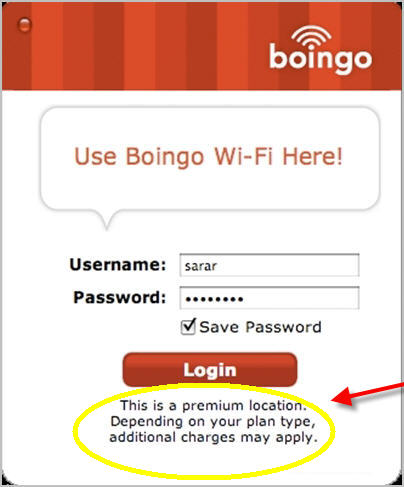
The premium locations that incur additional charges are available by default. … Perhaps they should be OFF by default, and only turned on by two or three clicks.

Certainly every month Baochi gets complaints from customers charged more than their expected monthly total. Most cannot recall clicking on any premium locations. They were in a rush, and didn’t pay attention to that text.

If you travel, you could get good value. … On the other hand, since Starbucks went free, I’ve not needed a paid subscription. And don’t plan to get one in future. Starbucks has a strong WiFi signal 99% of the time. Many Boingo hotspots cannot stream a YouTube video.

However, Boingo’s now released a brilliant FREE service that I recommend for everyone.

A FREE app that helps you find and locate FREE and Boingo hotspots at thousands of locations worldwide.

Click PLAY or see how it works on YouTube.

Download it here.

Choose Windows, Mac, iPhone / iPad, or Android.

Every time you open up your computer in a new location, the app will tell you if there’s free Wi-Fi available.

Brilliant.

After testing it the past couple of weeks in California and Nevada, I’m getting about 70% false positives. The app says there is free WIFi … but that’s not true. I’ve deleted the app on my laptop.
__________________________

For example, in the case of Starbucks (log-in required) it gets it wrong.
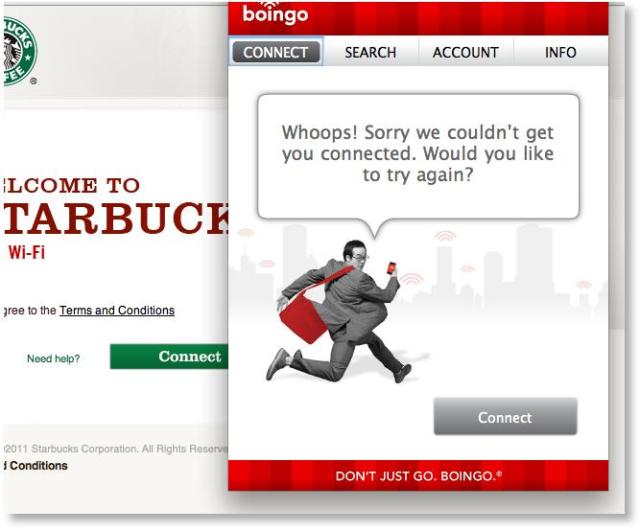
screen grab

I have to find the Starbucks log-in page. And log-in, as usual.
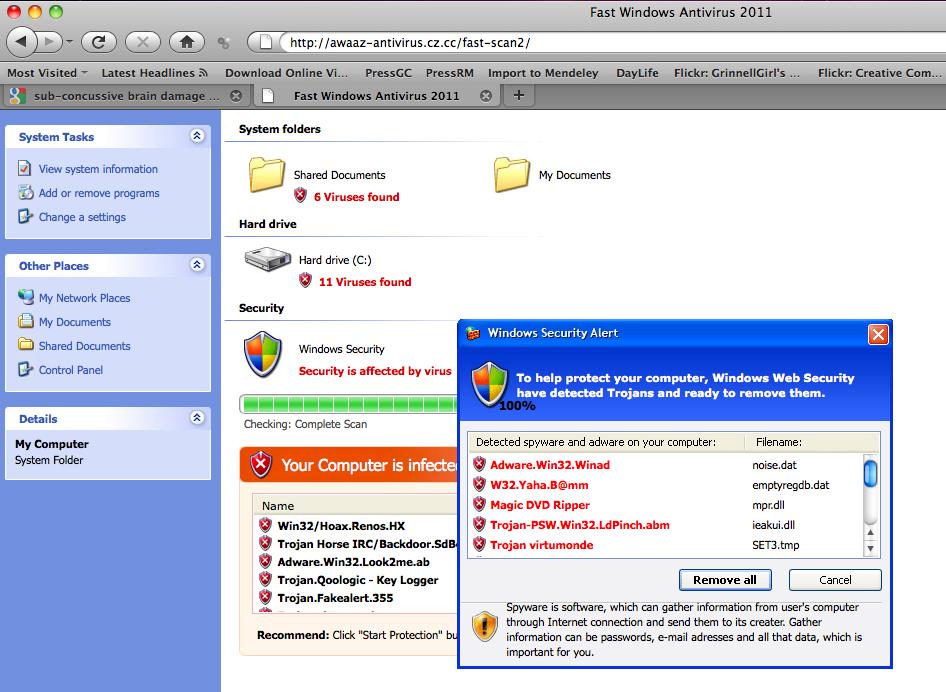
Fake “MAC Defender” antivirus scam

Macs almost never get a true computer virus.

But there is a scam reaching Apple computers right now. I saw it go by once.

Ignore and it’s not a problem. They’re trying to get your credit card number and/or master password.

Fake “MAC Defender” antivirus app scams users for money, CC numbers

Typinator vs TextExpander vs Snippets

I downloaded trial versions of these 3 software packages (but not Presto), useful for a blogger.

… And eventually decided on Typinator. (20Euro … though I found a discount code for 30% off)

TextExpander is supposed to be a little better, but I had several problems with it on my particular MacBook Air.

Head to Head: Text Expander Mac Software Compared

in praise of bloggers

My second and third favourite sources of information in 2011 are audio:

• Audiocasts
• Audio books

I pretty much always have an audio book or two in progress, buying most of those from Audible.com. … Sadly not every book I want is available in audio.

Audio podcasts are still quite crude. The most evolved, however, are superb: RadioLab, This American Life, CBC Spark, Economist Editor’s Highlights, and On The Media. Almost all audio podcasts are still free.

But my main sources of information … my most trusted … my most detailed and nuanced … are blogs.

The best are labours of love by passionate, often amateur writers. Most bloggers are unpaid, spending thousands of hours focused on a specific topic simply because they love that topic.

more photos of bloggers

For example, the best Apple blog is Daring Fireball. I don’t pay much attention to any other.

I do whatever I’m told by Michael Geist when it comes to Canadian government regulation of the internet. A big election issue right now.

There are 4-5 essential blogs on gymnastics, but if I only was allowed to read one blogger it would be Blythe Lawrence.

If you read Kraig Becker, you’ll know more about outdoor adventure than you’ll ever need to know for one lifetime.

… Those are just a few examples. Leave a comment if you’ve got a blog that I should follow.

(blogger photos via Spark)

you want an iPad 2

The iPad 2 was announced on March 2, 2011. It will be in stores soon.

Click PLAY or watch the promo on YouTube.

It’s the little details that make Apple great.

Click PLAY or see the iPad Smart Cover on YouTube.

2010 was the year of the iPad.

Click PLAY or watch how people use them on YouTube.

Tech pundit Leo Laporte bet fading tech pundit John Dvorak it would sell 5 million units in 2010. It sold nearly 15 million, even more than Apple projected.

Steve Jobs says 2011 will be the Year of the iPad 2.

He’s right. But competitors will begin to catch up as they have in smart phones. Catching up to Apple in profits will take years longer.

Eventually Google Droid devices will surpass Apple in sales and popularity. The only question is, how long will that take?

related – The best take on the iPad 2 launch I’ve read was by the unofficial blogger for Apple, John Gruber – The Chair

Note: The Kindle sold about 10 million units in 2010. But it’s really not an iPad competitor. Many folks have both a tablet and Kindle.

Xoom vs iPad 2

Dave and I did a little comparison shopping after the launch of the iPad 2.

If you want to be cool, get the iPad 2.

If you like fit and finish, get the iPad 2.

Andy Ihnatko:

But you kind of have to hold the iPad 2 to really get the redesign. It’s thinner by a third, plus its edges taper to a thin line of metal. It’s almost inconceivable that this thing you’re holding is a multicore tablet computer. The Xoom tablet is trim, light, and very pretty … but when you place it next to the iPad 2, it looks as though it was designed and built by angry Soviet prison labor instead of by Motorola.

If you’re an annoying Apple fanboy, get the iPad 2.

_____

I’m an annoying Apple fanboy and there are some things superior with the Xoom.

Click PLAY or watch the Xoom promo on YouTube.

OK it’s not as friendly as an Apple device:

… The Xoom is not a tablet you would hand to your mother; it is cold and complex and industrial and vaguely foreboding, the look and feel resembling a glossed up slice of Blade Runner. Everything is black, with glowing blue accents. …

Gizmodo

The operating system (Android 3.0 Honeycomb) is arguably more powerful. And within a few months will be much more powerful.

The built in Chrome browser is as good as the Safari browser on the iPad, and getting better, faster.

The Xoom has an SD card slot (function coming soon), something I really miss in Apple devices.

Overall, for a brand new product … it’s amazingly ready to compete with the iPad 2.

By summer, as apps roll out, the software will be as good. Or better.

And far more customizable. I’d change the dark theme to a light one, ASAP.

I have faith in Google to throw millions into the operating system until it’s superior to the iPad. That might take a year. It might take 6 months.

Motorola Xoom Review: The Future Of Tablets (Whether You Like It Or Not)

Click PLAY or watch a comic comparison on YouTube.

best Mac twitter clients?

I’ve had it with TweetDeck and Seesmic Desktop. Adobe Air and Microsoft Silverlight software sucks. The never ending updates are infuriating.

The trend in 2011 is to use the Twitter.com website. Not bad.

Or one of the new lightweight simple Twitter apps. I’m running both Twitter app (free) and Kiwi desktop (free with ads).

Both are excellent. I’d say Kiwi is slightly better. It requires the latest version of the Mac operating system, Snow Leopard.

kiwi-app.net

… That said, I think twitter is the most over-rated web service ever. It’s a waste of time for most people. (But for a few, especially bloggers, it can be valuable.)

UPDATE: There’s a very similar email client called Sparrow ($10)

best browsers: Chrome and Firefox

I keep both open on my Mac at all times, switching frequently.

Lifehacker posted a reader’s poll where ‘power users‘ strongly liked those two best.

Since that poll, Firefox has closed the gap. A little.

The main rule, however, is do not use Internet Explorer … unless you have to. IE still sucks, though it’s not as ghastly as in the past.

If you want to know why click over to Lifehacker – How and Why Chrome Is Overtaking Firefox Among Power Users

UPDATE: … The next version of Internet Explorer (not available yet) was just reviewed. Some improvement. But it only works well on Windows 7 and Vista, not XP. And, as usual with Microsoft, it’s too little too late.

Second UPDATE: Dave Sykes links to a BBC Tech reporter who confirms IE 9 is available for download. Microsoft claims it’s now the fastest browser on Windows 7. … When I went to check, all I can find is the IE9 Release Candidate. That’s still something of a Beta.

Microsoft doesn’t care much about IE, in any case. The big problem at Microsoft is Windows Phone 7, too little too late.

why ‘normal’ people won’t give up Cable TV

Ad agency Hill Holliday recently conducted an experiment, asking five families to give up cable TV in favor of connected TV devices for a week.

The growing availability of online content and video subscription services, coupled with an exploding market for connected devices, has pushed the idea of cord cutting — or dropping a traditional cable TV subscription package in favor of online video sources — into the mainstream. But how viable is the concept, really?

For its experiment (which the agency stresses was not intended as a scientific research study), Hill Holliday provided each family with a different connected device: the Roku, Apple TV, Xbox 360, Boxee Box and Google TV.

An Experiment In Cord Cutting from Hill Holliday on Vimeo.

Traditional Cable TV is horrid. But the alternatives are still even worse.

When is Apple or Google going to get it right?

(via Mashable)

Leo Laporte in the NY Times

My man Leo got a nice shout out …

TWIT gets its name from Mr. Laporte’s flagship podcast, “This Week in Tech,” which is downloaded by a quarter of a million people each week. He produces 22 other technology-focused podcasts that are downloaded five million times a month. He also streams video all day long that captures his podcasting and a weekend radio show on computers, “The Tech Guy,” that reaches 500,000 more people through 140 stations. …

Talking Tech and Building an Empire From Podcasts

I’m a dedicated soldier in the TWIT army listening to perhaps 7hrs / week of his broadcasts from twit.tv.

Like almost everyone I subscribe via iTunes.

My favourite shows are This Week in Google and MacBreak Weekly.