MacBook Air – my review

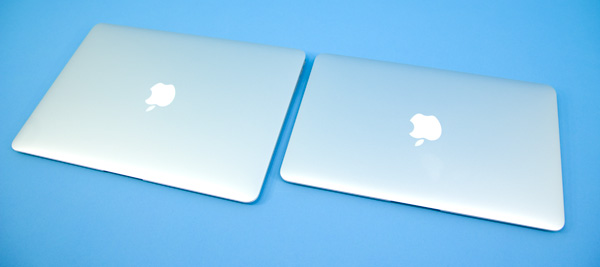
I’ve been switching from my old MacBook to a MacBook Air.

LOVE IT.

I can’t say that I’ve any complaints.

The perfect computer for 95% of people 95% of the time. Perfect for Facebook, email, browsing, photos, music, video.

Perfect for anyone who needs more than a phone when away from their main computer. If your smart phone is good enough, don’t bother. If you only need something like this at home, the cheapest iPad using wifi is a better solution.

My advice is to get the least expensive 11 inch. Unless you have some special requirements. It gets about 4hrs in real life use on a new battery. The idea is that you will only plug it in at night, with your phone.

On top of that you’ll need a USB card reader for your camera. Either Microsoft Office or the Apple iWork suite. And an external hard drive for storing data. And a USB to ethernet adapter if you want to plug in. … Leave a comment if you have questions.
detailed review

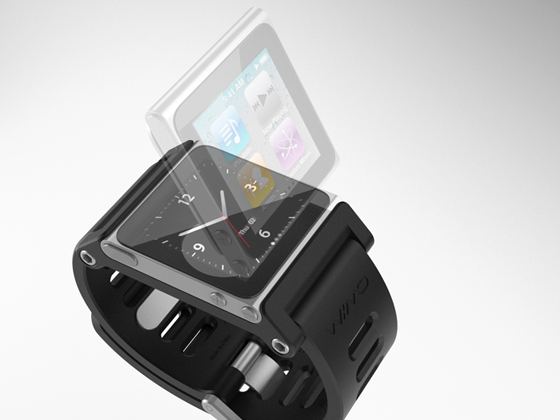
iPod Nano watch

This is the best watch band designed to fit the new Nano I’ve yet seen.

It’s not available now. But I’m expecting to see them in the Apple store by early 2011. $40.

I’ll be back to wearing a “wrist watch” after many years wrist naked.

details

I bought a MacBook Air

Went with the smaller 11” model, but bumped up the memory to 4GB and the flash memory hard drive to 128GB.

Click PLAY or watch a review video on YouTube.

I’m projecting that this will be enough for me 90% of the time. (For the other 10% I’ll need to plug in an external drive. Or go back to my old MacBook laptop.)

If you are thinking about an Air for yourself, check the detailed review on ars technica.

new MacBook Air getting RAVE reviews

MG Siegler on TechCrunch:

… I’ve used it almost everywhere I’ve been for just about a week now. There’s no question in my mind that this has replaced my MacBook Pro as my go-to machine.

But here’s the really crazy thing. It’s not just the size of the thing that I love so much (I have the 13-inch model) — which is amazing — it’s the speed. This thing boots up in less than 15 seconds, ready to go. My i7 iMac with 8 GB of RAM takes something like 2 minutes. My i7 MacBook Pro takes at least 30-45 seconds, and it has an SSD drive.

Applications seem to load quicker. Files transfer quicker. The thing shuts down in about 3 seconds. Macworld has the initial benchmarks. They don’t lie. It just screams. …

Goodbye, MacBook Pro. The New MacBook Air Is That Good.

Turns out the aging Core 2 Duo processor is not a problem. An all Flash memory machine makes up for any loss of speed.

Click PLAY or drink the Apple Kool-Aid on YouTube.

Having played with a couple now, I can’t believe any woman could resist. They are ideal for ladies that only want to carry a purse.

The $999 base price looks great. But I’d recommend more memory. And a number of accessories, including adapter cables. It only has 2 USB ports and a video out port.

If I bought one, I’d end up spending around $1400

The newest version of MS Office for Mac is getting praised, as well. No reason not to switch to Mac.

the new MacBook Air …

I’m tempted.

The latest, greatest home run being hit out of the park by Apple. Starts at $999.

Click PLAY or watch a user generated ad on YouTube.

Details on Apple.

Upsides: less than 3lbs, long battery life, all flash memory storage, more …

Tempting. But likely a 5lb full-featured laptop is better for me.

Daring Fireball linked to this amazing statistic – 60 percent of Apple’s sales are from products that did not exist three years ago

funny Windows Phone 7 ad

Love it.

… our culture of mobile distraction

Click PLAY or watch it on YouTube.

Here’s another – Season of the Witch. (VIDEO)

I love it because this is the way you phone addicts look to those of us not yet addicted.

Microsoft is desperate to stop their bleeding in the smart phone market. They’ve announced 10 new phones with an all new operating system.

So far, so good, MS.

But the future is Google Android.

(via TechFlash – Windows Phone challenges us to pull our heads out of our phones)

Chrome vs Safari

In June, one test found that Chrome was only slightly faster than Safari on the Mac.

… I saw no compelling reason to switch to Chrome.

But in a real world wifi test on my personal Mac, Chrome was more than twice as fast as Safari downloading measured by speedtest.net.

Loading a YouTube video in both, the speed advantage of Chrome was obvious.

I’ll start using Chrome for video starting now. (With FlashBlock installed, of course.)

Because I use LastPass, it would be easy for me to switch over completely. … But using different browsers for different purposes might be the best solution of all.

UPDATE – I’ve switched permanently. Chrome is now my primary browser.

NEW iPod Touch …

Seems to me that this is Apple’s most used product these days. I use my (last generation) Touch non-stop. Love it.

Until Sept. 7th Apple has the usual back-to-school deal: MacBook with iPod CHEAP

… I was tempted to upgrade on both my laptop and Touch …

But the Touch is the old model, not the new. Too bad.

Click through to Apple if you want to see details on the new Touch. It’s petty sweet.

… In terms of battery life, Jobs declared the iPod touch will have 40 hours of playback.

The iPod touch will be available next week in 8GB, 32GB, and 64GB models at prices of $229, $299, and $399 respectively. …

The camera is NOT the same as the one in the iPhone though. Too bad, yet again.

So close, but so far.

screen video capture for Mac?

UPDATE: I eventually paid $69 for SnapZ Pro X, excellent, though pricey.

… Later somebody sent me a link for a $30 competitor, Voila. … Looks great.

_____
Original post:

I need to quickly capture video from my computer. There are still no ideal solutions, as far as I’m concerned.

• Jing FREE … 5min maximum, no audio, saves to crappy .SWF (flash) format

• Jing PRO $15 … 5min maximum, no audio

Camtasia $99 … complicated, slow, has features I don’t need

• Screenflow $99 … getting good reviews, but I find it even more complicated than Camtasia, slow, has features I don’t need

Screenflow also seemed to bomb the Finder on my Mac. The free trial version was first to be deleted.

• SnapZ Pro X is the best I’ve tried. But it’s $69.

I wish there was an open source, free alternative.

Apple Quicktime 10 is free on the most recent version of their operating system, Snow Leopard 10.6. It provides basic video screen grabs with audio. That’s only a CAD$35 upgrade for me.

I think I’ll try that.